Notebook KDP Interiors V.3: Evaluating a Ready-to-Publish Design Resource
For many aspiring and established authors, the journey to publishing a physical book on Amazon's Kindle Direct Publishing platform involves a crucial step beyond writing: interior design. A professionally formatted interior can significantly impact a reader's experience and perception of a book's quality. This is where pre-designed interior templates, such as Notebook KDP Interiors V.3, enter the equation as a potential solution. This article provides a balanced evaluation of this specific resource, comparing its approach to other common methods, discussing its distinct characteristics, and exploring the situations where it might be the optimal choice or where alternatives may be more suitable.
What Is Notebook KDP Interiors V.3?
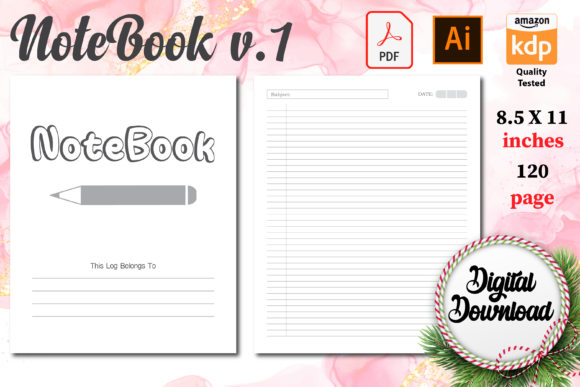
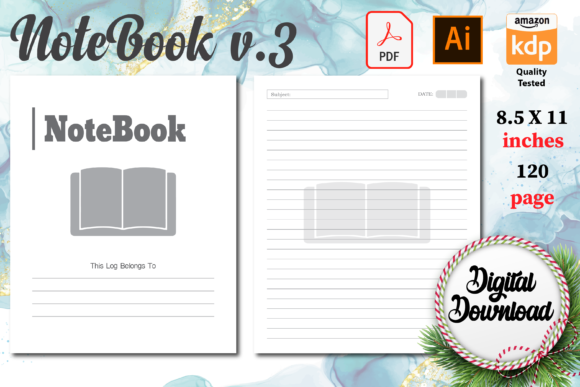
Notebook KDP Interiors V.3 is a digital product package specifically created for KDP authors. It is a collection of formatted interior page designs intended for use in notebook, journal, or logbook publications. The core offering consists of five files: a ready PDF, PNG files, JPG files, and the package emphasizes being "100 formatted and tested for KDP." The physical dimensions are set to the standard U.S. paperback size of 8.5 x 11 inches, and the files are described as high quality and print-ready. The inclusion of an Illustrator format file suggests that the package also provides the source designs for those who wish to make adjustments using professional graphic software, a feature that sets it apart from many purely static PDF templates.
The Distinct Approach of Pre-Formatted Interiors
The primary distinction of resources like Notebook KDP Interiors V.3 lies in their premise: offering a complete, tested design foundation to reduce the technical and time barriers to publishing. Instead of an author learning desktop publishing software, managing margins, bleeds, and pagination, or hiring a designer, they upload or print a provided file. This packaged solution contrasts sharply with several other prevalent approaches authors take.
Comparison with DIY Software Design
A common alternative is using software like Adobe InDesign, Microsoft Word, or free alternatives like Scribus to create a book interior from scratch. This approach offers maximum control and customization. Every font, spacing, graphic, and page element can be tailored to the author's exact vision. However, the tradeoff is substantial. It requires a significant investment in learning the software, understanding KDP's complex technical requirements, and dedicating time to the design process itself. Notebook KDP Interiors V.3 eliminates this learning curve and time cost by providing a finished, compliant product. The limitation, naturally, is that customization is confined to what the provided files allow, primarily through the included Illustrator format for those with the requisite skills.
Comparison with Hiring a Professional Designer
Hiring a freelance graphic designer or a formatting service is another route. This typically yields a highly professional, unique result tailored to the book's specific content and genre. The strength here is expertise and a bespoke product. The tradeoffs are financial cost and the need to manage a client-designer relationship, which includes clear communication and potential revisions. Notebook KDP Interiors V.3 sits at a different point on the spectrum: it is a one-time purchase that provides a professional-looking result without ongoing collaboration or high fees. It is a standardized product, not a custom service, which is its core benefit and its main constraint.
Comparison with Other Template Marketplaces
The digital marketplace for KDP templates is vast. Many products offer similar promises of being "ready to upload." Notebook KDP Interiors V.3 distinguishes itself within this category through its specific file bundle. Offering PNG and JPG files alongside the PDF can be useful for authors who wish to use individual page designs as images in other projects or for specific promotional purposes. The inclusion of the Illustrator source file is a significant differentiator; it provides a pathway for customization that most ready-made PDF templates do not, appealing to authors or assistants with some design software proficiency.
Evaluating Strengths and Potential Tradeoffs
Understanding the practical strengths and inherent tradeoffs of using a product like Notebook KDP Interiors V.3 is key to determining if it fits a particular publishing project.
A primary strength is speed and convenience. For an author who has compiled content for a notebook or journal and wants to move to publication quickly, downloading tested files and uploading them to KDP can be a matter of hours. This is invaluable for time-sensitive projects or for authors whose priority is content over unique design.
A second strength is assured technical compliance. The phrase "tested for KDP" addresses a major anxiety point for new publishers. KDP's printing process has specific requirements for margins, image resolution, and file format. A resource that claims to have already passed these hurdles reduces the risk of upload errors and rejection, providing practical peace of mind.
A third strength is the potential for cost-effective adaptation. Because the package includes the Illustrator file, it isn't entirely a closed system. An author with access to Illustrator, or who can hire a designer for a minor tweak rather than a full creation, can adjust colors, add a logo, or modify layouts. This hybrid model offers more flexibility than a rigid PDF-only template.
The tradeoffs are equally important to consider. The most evident is design commonality. Using a commercially available template means the interior design will not be unique. Other authors may use the same or similar templates. For a notebook—where content is often user-generated and design may be less critical than in a novel—this might be negligible. For a brand-building author wanting a distinctive series look, it could be a limitation.
Another tradeoff is content format specificity. Notebook KDP Interiors V.3 is explicitly designed for notebooks, journals, and logs. Its page layouts are likely optimized for those uses: perhaps containing numbered pages, dated entry spaces, or particular header styles. Attempting to adapt it for a different genre, like a poetry collection or a standard novel, would likely require extensive modification in Illustrator and might not be efficient. It is a specialist tool.
Finally, there is a tradeoff in software dependency for customization. The customization avenue relies on Adobe Illustrator, a professional, subscription-based software. An author without access to Illustrator would be limited to using the files as-is, or converting/editing the JPG/PNG files in simpler tools, which would degrade quality and professionalism.
Determining the Best-Fit Situation
The decision to use Notebook KDP Interiors V.3, or any similar pre-formatted interior, hinges on the author's priorities, resources, and project type.
Notebook KDP Interiors V.3 is likely an excellent fit for an independent author or small business creating a functional notebook, planner, or journal for sale on KDP, where the primary value is in the utility of the page layouts (e.g., workout logs, project planning pages, prayer journals). It fits situations where time-to-market is important, where the budget for professional design is limited or non-existent, and where a clean, print-ready aesthetic is sufficient. It also fits authors who have basic proficiency with Illustrator and intend to lightly brand the template with their own logo or color scheme without starting from zero.
An alternative path may be more suitable if the project requires a fully unique, artistic interior that serves as a key part of the book's identity—such as a children's book, an art book, or a novel with specific stylistic chapter pages. In those cases, a custom design service, despite the higher cost, would better achieve the goal. Similarly, if an author enjoys the design process and wants to build skills using more accessible software like Word or Canva for simple projects, the DIY route, despite being slower, might offer more long-term value and control.
Furthermore, if the intended book size differs from the standard 8.5 x 11 inches, this specific template would not be applicable without complex resizing, prompting a search for a template in the correct trim size or a different solution altogether.
Making an Informed Decision
Choosing a publishing resource is a practical decision with artistic and commercial implications. For notebook and journal projects, products like Notebook KDP Interiors V.3 represent a pragmatic middle ground between total DIY effort and full professional outsourcing. Their value is measured in saved time, reduced technical risk, and a baseline of professional presentation. The key for a potential user is to honestly assess their own needs: Is design uniqueness paramount, or is functionality and speed the driver? Do they have the skills or budget to modify the Illustrator file if needed, or will they use it as a static product? By weighing the convenience and compliance against the tradeoffs of commonality and genre-specificity, authors can determine if this approach aligns with their specific publishing objectives. Ultimately, such resources empower more people to publish physical books by simplifying one of the most daunting technical steps, provided their use is matched to the appropriate project type.