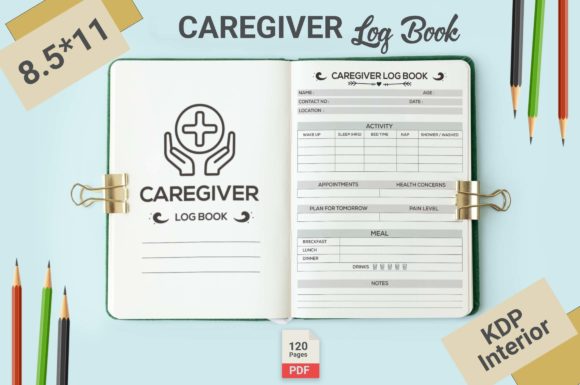
Caregiver Logbook KDP Interiors: A Practical Guide for Creators
If you're considering creating a caregiver logbook for Amazon KDP or similar platforms, the concept of using ready-made interior templates can be incredibly appealing. The promise of a complete, print-ready PDF, coupled with editable source files, seems like a shortcut to a professional product. However, the journey from download to successful upload isn't always as straightforward as it appears. Understanding exactly what a Caregiver Logbook KDP Interiors package entails, and how to use it effectively, is crucial to avoid common pitfalls that can undermine your project.
What Exactly Are KDP Interiors for a Caregiver Logbook?
In essence, these are pre-designed template packages specifically tailored for the niche of caregiver journals. They typically include a structured layout for pages like daily health logs, medication trackers, appointment calendars, and notes sections. The key components advertised—like 120 pages in a 8.5×11 trim size, a no bleed setup, and high-resolution files—are designed to meet Amazon KDP's technical specifications. The inclusion of editable Illustrator AI files is particularly significant, as it offers the flexibility to customize the content. For a creator, this means you aren't starting from a blank slate; you're building upon a professionally formatted foundation.
Overlooking the "Editable" Aspect
A major misunderstanding stems from the term "editable." Beginners often assume that downloading the file and uploading it directly to KDP will result in a unique, market-ready book. In reality, the PDF is often a generic template. If you upload it without customization, your logbook will be identical to anyone else who purchased the same interior. This lack of differentiation can severely impact your book's marketability and perceived value. Customers are looking for a tool that feels specific and useful; a generic template doesn't build trust or authority.
The practical advice here is simple: treat the AI source files as your starting point. Use Adobe Illustrator, or a compatible vector editing program, to personalize the content. Change section headings, adjust the layout of tracking tables, add your own introductory pages, or modify the color scheme. This transforms a template into your own branded product.
The Trim Size and Bleed Assumption
The specification of 8.5×11 trim size and no bleed is clearly stated, but its importance is frequently underestimated. The trim size is the final dimensions of your printed book. Choosing a package that matches your intended size is vital. The "no bleed" instruction means the design elements do not extend to the edge of the page, which simplifies the printing process for KDP. A common mistake is to try and force a design with bleed into a no-bleed template, or vice versa, resulting in cropped content or unsightly white borders. This directly affects the professional quality of the final printed logbook.
Before using the interior, always verify that your own cover design is created to the exact same trim size. A mismatch between cover and interior dimensions will lead to production errors. Double-check the PDF in a viewer at 100% zoom to ensure all text and borders are comfortably within the margins as expected for a no-bleed design.
Assuming Print-Ready Means Perfect
"Print Ready PDF" is a powerful phrase, but it doesn't absolve you of final review responsibilities. The template may be technically compliant, but your customizations could introduce issues. A better approach is to conduct a meticulous pre-flight check. Scrutinize every page for:
- Font consistency: Ensure any text you added uses embedded fonts or standard KDP-safe fonts.
- Image resolution: If you inserted logos or graphics, confirm they are high-resolution (300 DPI or more) to avoid pixelation.
- Page order and numbering: Verify that the sequence of logs, calendars, and notes sections makes logical sense for a caregiver's use.
Uploading a file with even minor technical flaws can lead to KDP rejecting your submission or, worse, a customer receiving a poorly printed book, damaging satisfaction and reviews.
The Page Count Consideration
A package offering 120 pages seems generous, but the utility of those pages depends entirely on their structure. A mistake is to focus solely on the number rather than the content layout. For a caregiver logbook, functionality is paramount. Evaluate the template: does it have a balanced mix of daily entry pages, monthly overviews, and emergency information sections? Are there pages for tracking vitals, symptoms, and doctor's contacts? An interior with 120 pages of repetitive daily logs might be less useful than one with 90 pages of well-organized, varied templates.
Before committing to a specific Caregiver Logbook KDP Interiors package, look for sample pages or a detailed contents list. Think from the end-user's perspective—a caregiver managing complex health needs. The logbook should facilitate clear communication and reliable record-keeping. If the template lacks crucial sections, you'll need to use the editable files to create and integrate them, which requires more work.
Ignoring the Target Audience's Real Needs
Creators sometimes get caught up in the design aesthetics and overlook the practical application. A beautifully minimalist interior might not provide enough space for detailed notes. A overly complex design with small fonts could be difficult for a tired caregiver to use. The solution is to prototype. Print a few sample pages from your customized PDF and physically test them. Try filling out the log as if you were recording a day's medications, meals, and appointments. This hands-on test will reveal usability issues like cramped writing spaces or confusing instructions that you can correct before publication.
Furthermore, consider the binding. A 120-page logbook at 8.5×11 might be quite thick. Ensure your design accounts for inner margin creep (the shifting of content as pages are bound) so text near the spine remains readable. The editable AI files allow you to adjust margins globally, a detail often missed by beginners.
From Download to Upload: A Strategic Process
The final step—uploading to KDP—should not be rushed. A systematic approach saves time and prevents frustration. After downloading the package, first inspect all files. Confirm you have both the PDF and the AI source files. Open the AI files in Illustrator to ensure they are indeed editable and not locked or corrupted. Begin your customization work in the source files, not the PDF, to maintain the highest quality.
Once your custom interior is complete and you've generated your final PDF, use Amazon's KDP previewer tool thoroughly. View the book on every available digital device simulator and order a physical proof copy. The proof is an invaluable check for print quality, color accuracy (if you used any), and overall feel. It's a small cost that can prevent a large-scale error.
Creating a successful caregiver logbook with a KDP interior template is about merging efficiency with thoughtful customization. The template provides the technical framework and saves you from intricate design work, but your contribution—tailoring it to the real-world needs of caregivers—makes the product authentic and valuable. By avoiding the common mistakes of treating it as a one-click solution, neglecting customization, and skipping final reviews, you can produce a professional, useful tool that stands out in the marketplace and truly serves its audience.